
In our busy lives, time is one of the most valuable resources we have. When handling work deadlines, you must find ways to save a few minutes. Managing personal projects also requires you to save a few minutes. When aiming to stay organized, it’s essential to save time. You even save hours from your daily routine. These savings can make a huge difference. That’s where AI tools come in. These smart assistants use artificial intelligence to handle repetitive tasks. They provide quick insights. They also automate processes that would otherwise eat up your day. In this blog post, we’ll explore 11 AI tools that save time daily, explaining each one clearly like a teacher guiding a class. We’ll cover what they do, how they help, their key features, pricing, and why they’re worth trying. By the end, you’ll have practical ideas to supercharge your efficiency.
Imagine starting your day with a clear plan, breezing through emails, and wrapping up meetings without frantic note-taking. These tools aren’t just gadgets; they’re like having a helpful sidekick. Let’s dive in and discover how they can transform your routine.
1. ChatGPT by OpenAI
ChatGPT is a versatile conversational AI developed by OpenAI. It’s like having a smart friend who can answer questions, generate ideas, and even write drafts for you. This tool excels at handling a wide range of tasks, from brainstorming blog ideas to explaining complex concepts in simple terms.
How does it save time daily? Instead of spending hours researching or drafting emails, you can ask ChatGPT for instant responses. For example, if you’re stuck on a report, you can outline it in seconds. This can cut down your writing time by half. Users often report saving 1-2 hours a day on routine queries and content creation.
Key features include natural language conversations, integration with tools like web browsing for real-time info, image generation via DALL-E, and code assistance for developers. It’s accessible via web, mobile apps, and APIs for custom uses.
Pricing starts free with basic access, but for advanced models like GPT-4o, the Plus plan is $20 per month. Team and Enterprise options are available for businesses, offering higher limits and collaboration.
The benefits are clear: It boosts creativity and speed, making it ideal for writers, students, and professionals. With ChatGPT, you focus on big-picture thinking rather than getting bogged down in details.

chatGPT screenshot – Chrome Web Store
2. Claude by Anthropic
Claude is an AI assistant from Anthropic, designed to be helpful, honest, and harmless. It shines in tasks requiring deep reasoning, like analyzing documents or generating creative content. Think of it as a thoughtful tutor who helps you refine ideas without overwhelming you.
This tool saves time by quickly processing and summarizing long texts, editing drafts, or even coding snippets. For instance, if you’re reviewing a contract, Claude can highlight key points in minutes, saving you from hours of manual reading.
Key features encompass web and mobile access, unlimited project organization in paid plans, deep research tools, extended thinking for complex problems, and integrations with Google Workspace for seamless email and doc handling.
Pricing is free for basics, Pro at $20 monthly (or $17 with annual billing) for enhanced usage and features, and Max from $100 monthly for heavy users needing priority access.
Benefits include improved decision-making and efficiency, especially for teams. It’s great for avoiding errors in writing or analysis, letting you produce high-quality work faster.

I Switched to Claude 3.5 for ChatGPT, here’s why
3. Perplexity AI
Perplexity AI is an AI-powered search engine that delivers accurate answers with sources cited, like a supercharged Google. It’s perfect for research-heavy tasks, providing concise summaries without the need to sift through endless web pages.
It saves time daily by turning hours of searching into seconds of querying. Whether you’re fact-checking for a blog post or learning a new skill, Perplexity pulls together reliable info instantly, often reducing research time by 70%.
Key features include semantic search, integration with multiple AI models, and Pro mode for advanced queries like file analysis.
Pricing is free for standard use, with Pro at $20 per month for unlimited searches, more models, and priority support.
The benefits lie in its reliability and speed, making it a go-to for journalists, students, and curious minds. You’ll spend less time verifying facts and more on applying knowledge.

What is Perplexity AI? And how to use it: A designer’s guide
4. Zapier
Zapier is an automation platform that connects apps and AI tools to create workflows, or “Zaps.” It’s like a digital bridge that automates repetitive actions across your tools, from email to project management.
How it saves time: By handling tasks like moving data between apps automatically. For example, it can send Slack notifications for new emails, saving you 20+ hours weekly on manual transfers.
Key features include AI workflow builders, custom agents, chatbots, and integration with over 7,000 apps. It also offers templates for common automations like lead management.
Pricing isn’t detailed here, but it has free tiers for basic Zaps and paid plans starting around $20/month for more advanced features.
Benefits include scaling operations without extra staff, secure data handling, and freeing up time for creative work. It’s essential for small businesses streamlining processes.

Build unstoppable workflows with Zapier | Zapier
5. Notion AI
Notion AI is built into the Notion workspace app, turning your notes and databases into smart, automated tools. It’s like an all-in-one organizer with a brain, helping with everything from note-taking to project planning.
It saves time by automating summaries, generating content, and searching across your workspace. For meetings, it can transcribe and highlight actions, cutting post-meeting work from hours to minutes.
Key features: Custom agents for workflows, enterprise search, content generation in your style, translations, and integrations with apps like Slack.
Pricing is included in Business/Enterprise plans; limited free trials otherwise.
Benefits: Creates a unified workspace, enhances team collaboration, and ensures privacy with no data training. Ideal for teams needing organized, efficient knowledge management.
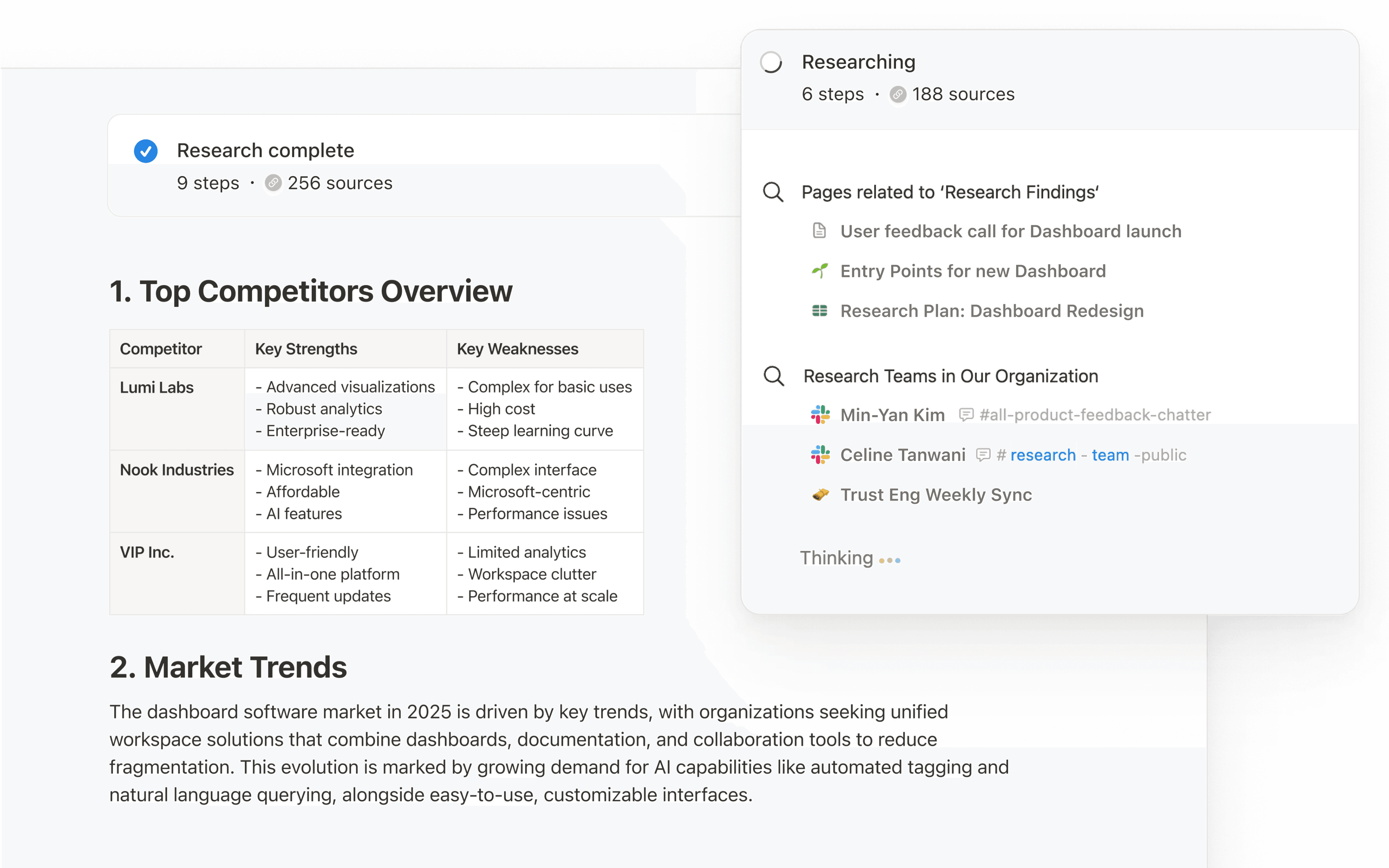
Meet the new Notion AI | Notion
6. Reclaim.ai
Reclaim.ai is an AI calendar tool that optimizes your schedule intelligently. It acts like a personal scheduler, blocking time for focus and adjusting to priorities.
This saves time by preventing overbooking and fragmentation. Users gain 7.6 extra focus hours weekly, reducing overtime and stress.
Key features: Auto-scheduling tasks, smart meetings, integrations with task managers, and analytics for balance.
Pricing: Free add-on, with paid plans at 30% off for new users.
Benefits: Improves work-life balance, boosts productivity by 55%, and scales for teams. Great for busy professionals avoiding burnout.

Reclaim Review: Pros, Cons, Features and Pricing
7. Grammarly
Grammarly is an AI writing assistant that checks grammar, tone, and clarity in real-time. It’s your editor in the background, polishing everything from emails to reports.
It saves time by catching errors instantly, reducing editing rounds. Organizations save 20 days per user annually on writing.
Key features: Tone adjustments, AI text generation (100 prompts free), style guides, and audience previews.
Pricing: Free basic, Enterprise custom with unlimited prompts.
Benefits: Enhances communication quality, increases efficiency, and saves costs. Perfect for anyone who writes daily.

Grammarly website screenshots and UX UI design references …
8. Otter.ai
Otter.ai is an AI notetaker for meetings, transcribing and summarizing conversations automatically. It’s like having a secretary who never misses a detail.
Saves time by eliminating manual notes, with users reclaiming 4+ hours weekly. It extracts actions and allows querying past meetings.
Key features: Live transcription, AI chat for insights, integrations with Zoom and CRM tools.
Pricing: Free basic, Business $19.99/month, Enterprise custom.
Benefits: Streamlines follow-ups, improves collaboration, and integrates workflows. Essential for remote teams.

Transitioning to Otter.ai for Notetaking Assistance – Office of …
9. Canva Magic Studio
Canva Magic Studio brings AI to design, making visuals quick and easy. It’s for creating graphics, videos, and presentations without pro skills.
Saves time by generating designs from prompts, resizing, and editing in clicks, speeding up content creation.
Key features: Magic Write for text, Media for images/videos, Resize, Background Remover, Animate.
Pricing: Free basics, Pro/Teams for advanced AI.
Benefits: Scales creativity, maintains brand consistency, safe for teams. Fun for marketers and educators.

Unleashing Your Creativity with Canva Magic Studio
10. Jasper
Jasper is an AI for marketers, automating content from blogs to ads. It connects strategy to creation seamlessly.
Saves time by producing on-brand content fast, automating 60% of SEO, saving 10,000+ hours yearly.
Key features: Canvas for planning, Studio for workflows, IQ for brand voice.
Pricing: Not specified, but plans for individuals/teams.
Benefits: Speeds campaigns, ensures consistency, scales output. Ideal for content teams.

How to use Jasper AI as your writing assistant | Zapier
11. Fireflies.ai
Fireflies.ai is a meeting AI that records, transcribes, and analyzes calls. It’s your memory bank for conversations.
Saves time by auto-summarizing and reducing follow-ups, bringing structure to discussions.
Key features: AI search, sentiment analysis, integrations with CRM/Slack.
Pricing: Not detailed, but tiers available.
Benefits: Retains details, automates tasks, secure data. Great for sales and project teams.

Fireflies Feature Focus: Auto-capture screen recordings
Wrapping Up: Make Time Your Ally
These 11 AI tools that save time daily are game-changers for productivity in 2026. From automating schedules with Reclaim.ai to crafting designs in Canva Magic Studio, they handle the grunt work so you can focus on what matters. Start with one or two that fit your needs—perhaps ChatGPT for quick ideas or Grammarly for polished writing. Over time, integrating them could reclaim hours each day, leading to better work-life balance. What’s your favorite tool? Share in the comments!
Thanks for sharing. I read many of your blog posts, cool, your blog is very good.